What News does
News brings the economic calendar into StrategyQuant X as timing: when the next release is due, how important it is, which currencies it touches, and whether a release falls inside this bar. It imports the calendar from MetaTrader 5, converts it to UTC once, publishes it as builder blocks, and copies the same file back to MetaTrader automatically after each import, so a strategy that stood aside for payrolls in the backtest stands aside for the same minutes live.
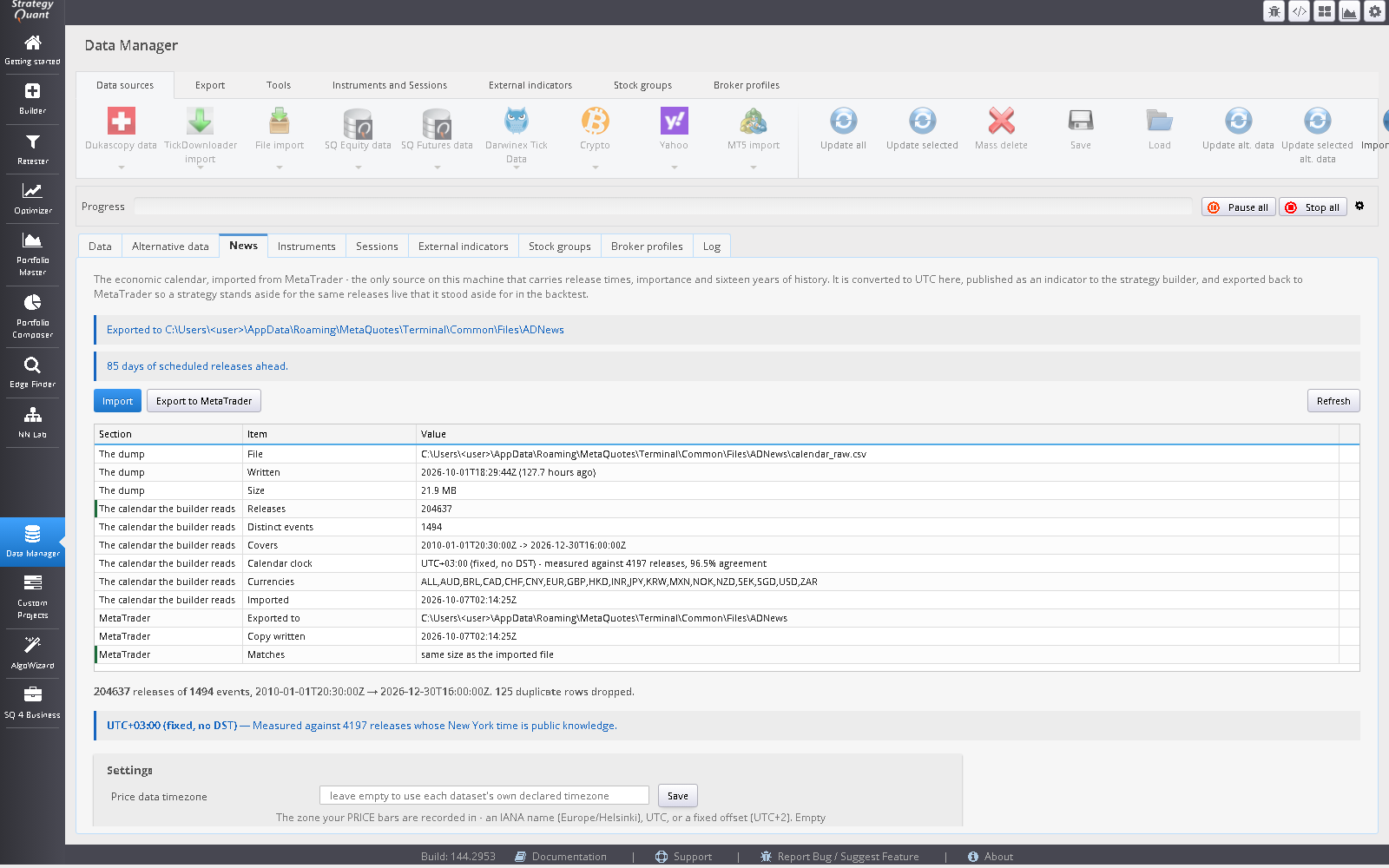
Why it runs the other way from Alternative Data
Alternative Data downloads from public providers and MetaTrader reads what SQX wrote. News runs the other way, because the data does: no free historical feed carries release times, importance and many years of history across every major currency, but MetaTrader’s calendar does, and it is already on the machine. So the terminal is the origin. What does not invert is who owns the normalisation:
AWNewsExport script / AWNewsFeed service
        the calendar exactly as the terminal reports it, in the terminal's own clock
                  |
                  v
Common\Files\AWNews\calendar_raw.csv
                  |   Data Manager -> News: measure the timezone, convert to UTC, sort, deduplicate
                  v
user\extend\News\events.csv  ------------>  the News building blocks
                  |   the same bytes, copied back automatically after Import
                  v
Common\Files\AWNews\events.csv  ---------->  AWNews indicator
One converter, one artefact, two readers. Two implementations of “convert the terminal’s calendar to UTC and sort it” would agree today and have nothing keeping them equal tomorrow.
Three things this module gets right that are easy to get wrong
1. The clock is measured, not configured
MetaTrader hands out calendar times in the terminal’s own timezone, which is whatever the broker’s server runs on. That may be a fixed offset with no daylight saving, or EET, which is the same offset for half the year and an hour different for the other half. An hour is not a rounding error: shifted by an hour, a fifteen-minute blackout stops covering the release and starts covering a quiet stretch beside it. Nothing downstream can detect it: the file parses, the coverage is complete, the blocks return numbers, and the only symptom arrives months later in production.
So the offset is measured on every import. Fourteen American releases whose New York wall-clock time has not changed in decades (payrolls at 08:30, ISM at 10:00, the EIA petroleum report at 10:30) have a computable UTC instant for any date. Comparing that with what the terminal wrote gives the offset it wrote the row in, and thousands of such rows over many years give it for every season, which is enough to separate a fixed-offset server from one that shifts, and a European shift from an American one. For example, on a fixed UTC+3 server, ISM Manufacturing released at 10:00 New York reads 18:00 in January and 17:00 in July.
The result, with its confidence and sample count, is shown on the News tab (for example FIXED:180) and written to events.meta. The chart bars can run on a different clock from the calendar, so the reader uses a separate bar clock, bar_tz, also in events.meta. On a MetaTrader terminal the feed service measures it from the weekend reopening of the bars, and never overwrites a value you set by hand: it only warns. The MetaTrader indicator reads bar_tz rather than guessing, checks it against its own TimeCurrent() - TimeGMT() on a live chart and says so loudly if they disagree, which is what happens when a file made for one broker’s terminal is used on another’s. A small fraction of anchor releases will always disagree, because releases do get rescheduled (the EIA report moves to Thursday in holiday weeks, for instance).
The calendar’s clock is measurable because releases have publicly known wall-clock times. Your price data’s clock is not: it is a property of whoever recorded the data. SQX stores it on the data row and the blocks use it when it is there. When it is not (an imported CSV usually has none), the blocks say so in the log and treat bar times as UTC. Set Price data timezone in the News tab if that is wrong. An hour of error here moves every blackout window off the release it was meant to cover, with no other symptom.
2. Schedule, never outcome
Every block is a function of when a release is due, for which currency, and how important the event is. None of them touches what was released. That is a quarantine, not an omission. The figure that MetaTrader’s history returns for an event is the value as it stands today, after every subsequent revision, so reading an old release now gives a number nobody could have known at the time. A “surprise = actual − forecast” feature built from history is contaminated, and in the most flattering way: it is largest exactly on the releases that were revised most. The forecast column cannot anchor it either, being empty for every row before 2017.
Release times have none of these problems. They are published weeks ahead, are never revised, and are complete back to 2010, so using tomorrow’s release time on today’s bar is not a leak; it is what every desk does with a calendar. Outcome features would need a write-once recording made at release time; they are deferred, not cancelled.
3. The export carries the future
A calendar that ends today cannot answer “how many minutes until the next release”: a live strategy would read the saturated value on every bar and conclude the coast was permanently clear. The dump (written by AWNewsFeed or AWNewsExport) therefore runs to now + 90 days and reports how many releases lie ahead, warning if the answer is zero. The News tab makes the remaining forward window the first thing on the page.
Setup
Start the AWNewsFeed service
Start
AWNewsFeedin MetaTrader on a terminal whose Toolbox Calendar tab has content (the installer can register it). It writes both the history and the releases scheduled ahead toCommon\Files\AWNews\calendar_raw.csvand keeps the file current without anyone copying anything. If you do not run the service, run the scriptAWNewsExportonce instead; it writes the same dump.Import in SQX, once
Data Manager → News → ribbon tab News: Import calendar
The builder and the backtests read only the file this import writes. The calendar’s timezone is measured from the dump, not assumed. Check the calibration line and the forward window. The first import also gives the feed service an
events.csvto verify against.Nothing to export back
After the import, the normalised
events.csvis copied toCommon\Files\AWNewsautomatically (thenews.autoExportsetting, on by default), soAWNewsreads the bytes the builder read. The News ribbon tab’s Export to MT button repeats that copy by hand if you switched the setting off.
If another EA already writes a calendar dump, list its location in news.rawDumpAlt in altdata.config; the tab shows every place it looked if no dump is found.
The News tab
- How it works
- A link on the tab’s toolbar. It opens the set-up instructions above, the paths searched if no dump is found, and what the calendar does not carry.
- The toolbar verdict
- The remaining forward window (“59 days of scheduled releases ahead”) in green, amber or red. The grid below lists the dump, the calendar the builder reads and the MetaTrader copy; the search box filters it.
- Import calendar
- A ribbon button (Tools group). Reads the dump, measures the timezone, converts to UTC, sorts and deduplicates, and writes
events.csvandevents.meta. - Export calendar to MT
- A ribbon button. Copies the event file to
Common\Files\AWNews. This already happens automatically after an import unlessnews.autoExportis switched off. - News settings
- A ribbon button that opens the settings dialog below; Save writes only the settings you changed. After an import a result dialog reports the rows, the measured clock and any problems.
- Price data timezone
- The zone your price bars are recorded in: an IANA name (
Europe/Helsinki),UTCor a fixed offset (UTC+2). Empty means each dataset’s own declared timezone is used, which is right whenever SQX has one. However, an empty setting writes no globalbar_tzfor MetaTrader: it cannot read SQX’s per-symbol timezone, so without an independently measured MT5 bar clock the EA can fall back to the calendar-dump clock. The News tab warns when this setting is empty. Set it only if the same timezone applies to every exported symbol; do not infer it from the calendar clock. Stored asnews.dataTimezone. - Calendar clock override
FIXED:180,EU_DST:120orUS_DST:-300. Leave it empty unless the measurement is wrong. It is measured from the dump on every import; an override that disagrees is reported but obeyed.- Minimum importance to keep
- 0 keeps everything including bank holidays, at a cost of about two thousand rows over sixteen years. The blocks filter by importance themselves, so there is rarely a reason to raise this, and raising it shortens the file, which the import refuses unless the shrink is allowed deliberately.
- Dump path override
- Point the import at a dump somewhere else.
- What this calendar does not carry
- A reminder panel: release times, currencies and importance, and nothing else. No actual figure and no forecast, deliberately.
The event file
time;currency;importance;event_id;name
2024-01-05T13:30:00Z;USD;3;840030016;Nonfarm Payrolls
UTC, sorted ascending, deduplicated on (time, event), one row per release. Timestamps are exactly 20 characters so the MQL5 reader can pull the fields by position. name is last because it is the only variable-width field and no block reads it; it is there so the calendar can be audited by eye. events.meta beside it records the measured offset, its confidence and sample count, the coverage and the currencies present.
Builder blocks
One indicator and eight condition blocks.
| Block | True when / provides |
|---|---|
| News (indicator) | Outputs MinutesToNext, MinutesSinceLast, NextImportance, LastImportance, CountInBar and Available. |
| News blackout window | Inside a window of MinutesBefore before and MinutesAfter after a qualifying release. |
| News is clear | Outside that window. |
| News bar has release / has no release | A qualifying release falls inside this bar, or none does. |
| Minutes to next lower / higher | The approach, as a continuous quantity: the next release is fewer or more than N minutes away. |
| Minutes since last lower / higher | The post-release window: fewer or more than N minutes since the last release. |
Parameters
| Parameter | Default | Options and meaning |
|---|---|---|
MinImportance | High only | Any, including holidays (0); Low and above (1); Moderate and above (2); High only (3). Level 3 is High importance only. Level 0 includes bank holidays, which are worth avoiding for a different reason. |
Scope | Symbol currencies | Symbol currencies; Every currency; USD only; EUR only; GBP only; JPY only. “Symbol currencies” reads the pair from the chart symbol (EURUSD watches EUR and USD), falling back to USD for an instrument whose name carries no currency. The resolution is by symbol shape, not a substring scan: a substring scan maps WALLSTREET to the Albanian lek through the ALL inside it, and a US index would take its blackout from Tirana. |
MinutesBefore | 15 | 0–2880 minutes. The builder searches 5–60 in steps of 5. |
MinutesAfter | 15 | As above. |
Shift | 0 | Bar shift; use 1 in a live strategy so the rule reads a closed bar. |
Every block checks Available before comparing, including the ones phrased as an all-clear. With no calendar imported, News is clear is false on every bar: a rule that cannot be evaluated must not permit trading. The practical result is that a build on a machine with no calendar never selects these blocks, which is the correct outcome.
What is deliberately not here
- No “news within N bars” block. Bars are not a unit of news: the same rule means five minutes on M1 and twenty hours on H4. Minutes are the unit that holds across timeframes.
- No per-event block. Well over a thousand distinct events is not an axis the builder can usefully search; importance is.
- No surprise block. See “Schedule, never outcome” above.
The resolution limit
Everything is measured from the bar’s opening time, because that is what a chart’s time at a shift is. On an M5 chart that makes a five-minute blackout an accurate instrument. On an H4 chart it is not: the bar opens, and four hours happen inside one value of MinutesToNext. The question at that resolution is CountInBar. Put the blackout blocks on M1 to M15, and use the news-bar blocks on anything higher.
Trading around news, not only avoiding it
- Avoidance: “out five minutes before, nothing new until fifteen after” is News blackout window (5, 15) as an entry veto, or News is clear (5, 15) as an entry condition.
- News straddle (5-minute): News bar has release marks the news bar; the entry is a stop order on either side of that bar’s range.
- Simple news trade (15-minute): News bar has release at shift 1 plus a price condition on the news bar’s direction.
- Post-release momentum: Minutes since last lower than 30 opens a window that begins at the release rather than avoiding it.
The package ships strategy templates and example strategies that use these blocks. Treat them as starting points.
MetaTrader 5
AWNewsExport(script)- Only needed where the service does not run. Dumps the calendar to
Common\Files\AWNews\calendar_raw.csv, from 2010 to now plus 90 days, and reports the releases ahead. AWNews(indicator)- Reads
events.csvand emits the same outputs as the SQX indicator. It reads the measured offset fromevents.metaand checks it against the terminal’s own clock, warning if they disagree. AWNewsFeed(service)- Rebuilds
events.csvon the terminal from the terminal’s own calendar, so a deployed EA on a VPS keeps seeing releases coming. It needs no WebRequest host.
How the service keeps parity
What protects parity is verification, not a monopoly on writing. Before the service replaces an events.csv, it must pass three checks, and any failure keeps the existing file:
| Check | Refuses when |
|---|---|
| The anchors measured something | Fewer than 200 anchor releases, or under 90% agreement. |
| The calendar clock is still true | Fewer than 20 anchor releases in the last thirteen months, or under 90% of them reproduced by the fitted clock. |
| It reproduces what is there | More than 2% of the overlapping releases disagree. |
The last is a threshold because the two failure modes it separates are orders of magnitude apart: MetaQuotes legitimately adds calendar entries, so a few rows differ (well under one in a thousand), while an hour of clock error makes essentially every row differ. Nothing lands in between. The chart-bar clock is handled separately (see above). Set InpWriteEvents=false on the service if you would rather it only refresh the dump and leave the event file to SQX.
Platform support
| Platform | State |
|---|---|
| MetaTrader 5 | Full. AWNews reads the exported file. |
| PseudoCode | Full. |
| MetaTrader 4, NinjaTrader 8, JForex, EasyLanguage | Templates ship and call a helper that is not shipped, so an export using these blocks will not compile. No template ever substitutes a value for a missing calendar: an unsupported platform failing to compile is better than one quietly trading on a constant. |
Limits
- The calendar is MetaQuotes’ calendar. A release that MetaTrader does not list is not here.
- The measured clock needs the anchor releases to exist in your dump. A dump with little history gives a low-confidence measurement, which the tab shows.
- Timing only. There is no way to ask these blocks what a release said.
Troubleshooting
| Symptom | Cause and fix |
|---|---|
| The News blocks never appear in the Builder | No calendar is imported, so the blocks cannot be evaluated and are not offered. Check that the AWNewsFeed service is running, then press Import. |
| “No dump found” | Start AWNewsFeed (or run AWNewsExport once) on a terminal whose Calendar tab has content. The tab lists the folders it searched; set news.rawDumpAlt if another EA writes one elsewhere. |
| The forward window is zero or short | The dump was taken without the future. Check that the AWNewsFeed service is running and read the Experts log; it extends 90 days ahead. Then press Import again. |
| The blackout covers the wrong minutes | Check the measured calendar clock, and set Price data timezone for your price data. An hour of error in either moves every window. |
| The indicator warns that the bar clock disagrees | An events.meta made for one broker’s terminal is being used on another’s, or the broker’s daylight-saving rule is not the one in bar_tz. Set the data timezone in the News tab and import again. |
| The feed service keeps the old file | One of the three checks refused. Check that the service is running and read the Experts log, which names the check. Import in SQX rebuilds the SQX-side file. |
| Models report the calendar as stale | Start AWNewsFeed (Navigator → Services) so the file keeps being renewed. |