News

Stand aside for the same releases live that you avoided in the backtest.

News does not provide a calendar of its own. It extracts the economic calendar already held by your own MetaTrader 5 terminal, converts it to UTC once against a measured server offset, publishes it as strategy blocks in StrategyQuant X, and exports it back to MetaTrader 5. Every block is a function of when a release is due, which currency it affects and how important it is. None touches what was released.

  • StrategyQuant X Data Manager tab
  • MetaTrader 5 terminal required
  • Uses your terminal’s own calendar
  • Schedule only, never outcome
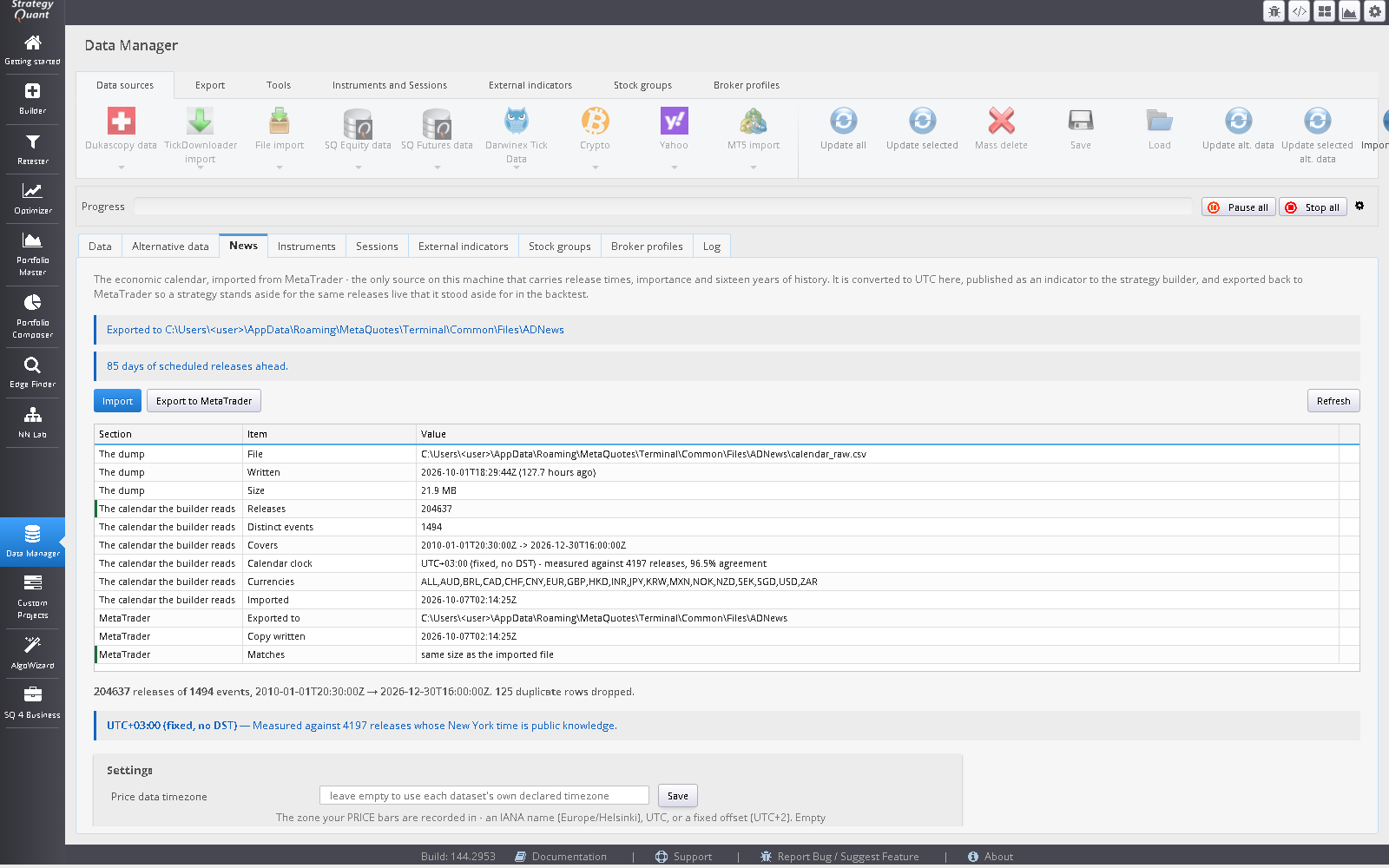
The News tab in the SQX Data Manager after importing the calendar from a MetaTrader 5 terminal.
Screenshot coming: The News tab after an import
The News tab after an import
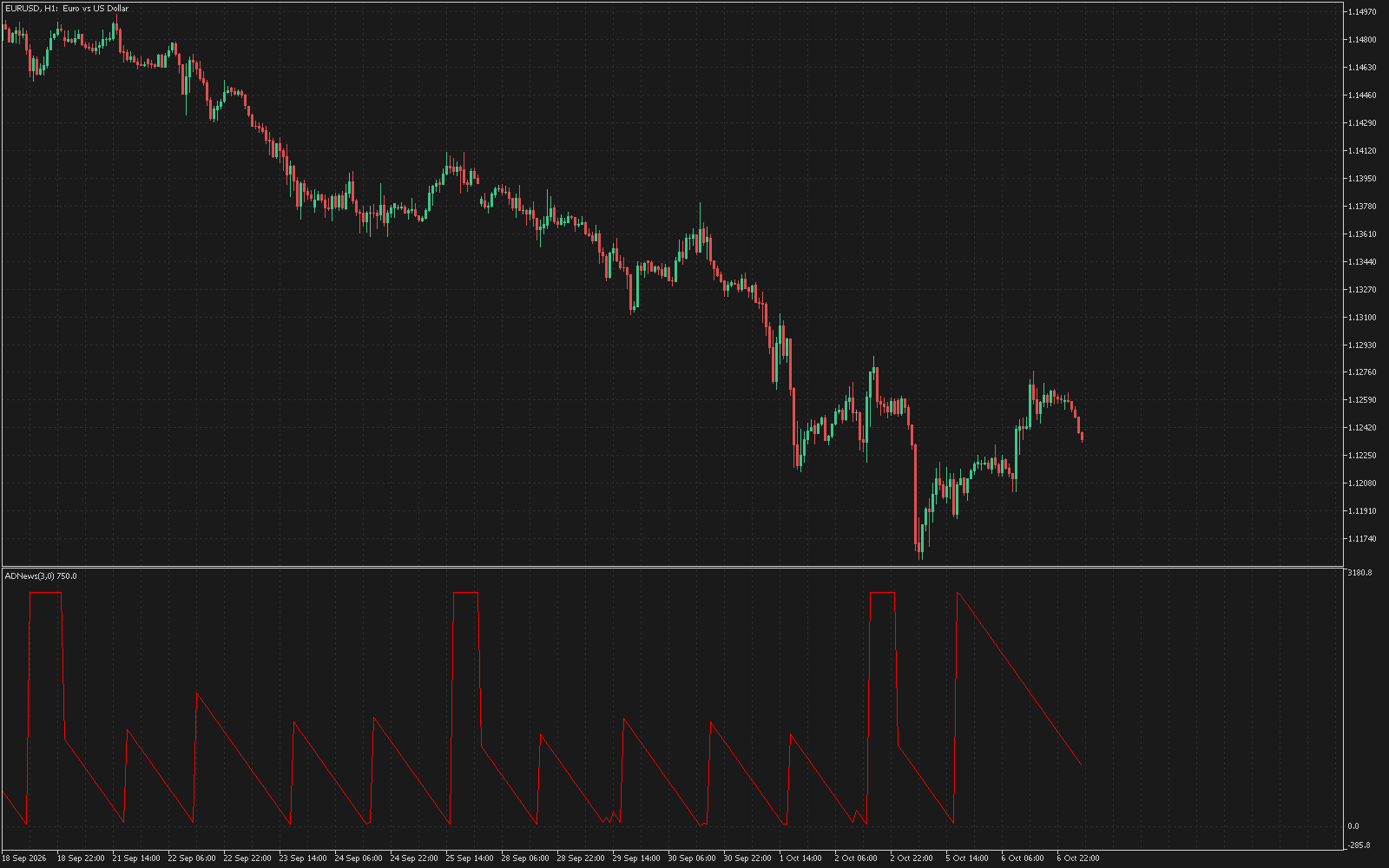
MetaTrader 5 chart with the AWNews indicator counting down to a high-impact economic release.
Screenshot coming: AWNews on a MetaTrader 5 chart
AWNews on a MetaTrader 5 chart
Blocks

Timing as a quantity the builder can use

The AWNews indicator reports minutes to the next release, minutes since the last, the importance of each, and how many fall inside the bar. Eight condition blocks sit on top of it.

  • AWNewsBlackout and AWNewsIsClear: inside or outside a window of N minutes before and M after a qualifying release.
  • AWNewsBarHasRelease and AWNewsBarHasNoRelease.
  • Minutes-to-next and minutes-since-last, lower or higher than a level.
  • MinImportance 0 to 3 (3 is the handful that actually moves a market) and a Scope that reads currencies from the chart symbol.

The avoidance rule many trading books state, out five minutes before and nothing new until fifteen after, is AWNewsBlackout(5, 15).

News blackout window around a releaseAn M5 chart with a scheduled release. The blackout covers five minutes before and fifteen after. The indicator reports minutes to the next release and minutes since the last one. release due 5 min before15 min after AWNewsBlackout(5, 15)
Fig. 1 — A blackout window around one release. Illustrative M5 bars, not market data. Put blackout blocks on M1 to M15 and the bar blocks on higher timeframes.
Two things easy to get wrong

The clock is measured, and the outcome is quarantined

1. The clock is measured, not configured

The terminal reports times in the broker server’s timezone, which may be a fixed offset or may shift with daylight saving. An hour of error is not a rounding error: a fifteen-minute blackout would then cover a quiet stretch beside the release.

So on every import, releases with long-fixed New York wall-clock times (payrolls at 08:30, ISM at 10:00 and others) are used as anchors to measure the offset the terminal wrote them in, for every season of every year. The result and its confidence are recorded and checked against a live chart. One clock cannot be measured: your price data’s. Set it in the News tab if your data lacks one.

2. Schedule, never outcome

The calendar API returns the actual value as it stands today, after every revision, so a surprise feature built from history is contaminated, most of all on the releases revised most. The forecast field is also empty for every row before 2017 in the dump this was built on.

Release times have none of those problems: published weeks ahead, never revised, and complete as far back as your terminal’s calendar goes. Using tomorrow’s release time on today’s bar is not a leak.

Keeping a deployed terminal current

Verification, not a monopoly on writing

One converter, one event file, two readers MT5 terminalcalendar_raw.csvin the terminal’s clock200k+ releases Data Manager → Newsmeasure the clockconvert to UTC, sort,deduplicate events.csv+ events.metaUTC, sorted AWNews blocks (SQX) AWNews.mq5 (MT5)
Fig. 2 — One converter, one event file, two readers.

The export runs to 90 days ahead, because a calendar that ends today cannot say how long until the next release, and a live strategy would conclude the coast was permanently clear. AWNewsFeed is a MetaTrader 5 service. Every six hours it rebuilds the event file from the terminal’s own calendar, with no internet access needed and no StrategyQuant involved, but only replaces it if all three checks pass:

CheckRefuses when
the anchors measured somethingfewer than 200 anchor releases, or under 90% agreement
the two clocks agreethe anchor measurement and the terminal’s own offset differ by more than a minute
it reproduces what is theremore than 2% of overlapping releases disagree

Fails closed

Every block checks availability first, including the ones phrased as an all-clear. With no calendar imported, AWNewsIsClear is false on every bar: a rule that cannot be evaluated must not permit trading.

Platforms and limits

MetaTrader 5 only. Only MetaTrader 5 exports are supported. Templates for MetaTrader 4, JForex, EasyLanguage and PseudoCode exist only so StrategyQuant X lists the blocks on every platform; they are not functional and are not supported for these blocks. Resolution is the bar’s opening time, so use blackouts on M1 to M15. There is no per-event block and no surprise block, on purpose.

Builder versus deployed

In StrategyQuant, press Import and then Export to MetaTrader to refresh the calendar the builder reads. A deployed terminal does not need that: its feed service keeps the file current while the terminal is running. If the file ever stops covering the future, the blocks report unavailable and the all-clear fails closed. The service does not run in the Strategy Tester.

For prop-firm traders

These blocks can keep a strategy out of the market around scheduled releases. That is a timing tool. It does not promise to keep any account inside a loss limit.

Licence

News

See pricing · also included in the Suite

Risk

Software output is not investment advice and says nothing about future results. Validate every strategy yourself before risking capital.