GapSmith

Fix the holes in your M1 history.

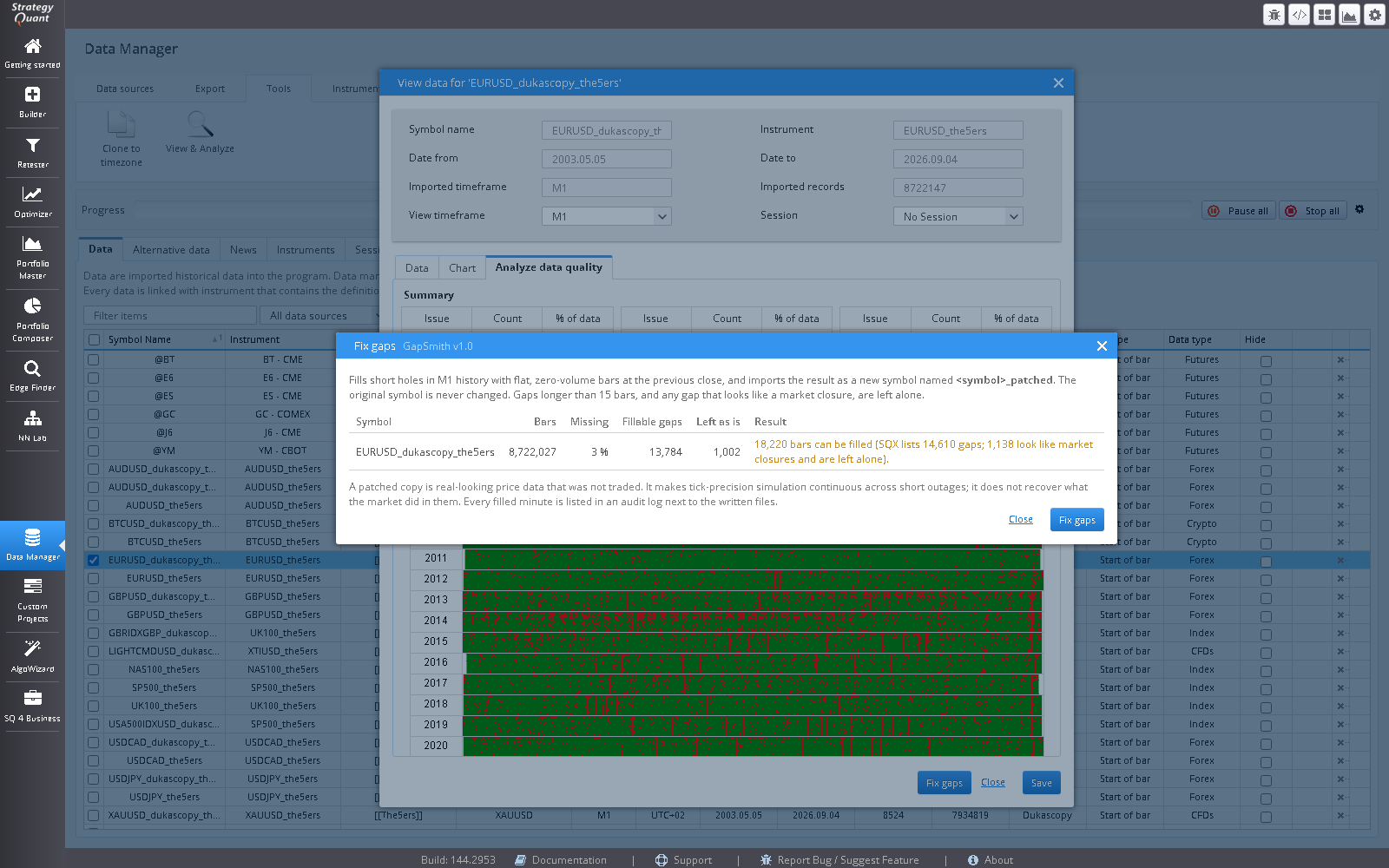
A Fix gaps button in the Data Manager’s Analyze data quality view, right where StrategyQuant X lists the gaps. See how many short gaps the symbol has, and GapSmith fills them and imports the result as a new symbol named <symbol>_patched. Your original data is never changed.

  • StrategyQuant X
  • Analyze data quality button
  • M1 history
  • No MetaTrader needed
The GapSmith Fix gaps dialog in the StrategyQuant X Data Manager, listing the symbol with their bars, missing share and fillable gaps.
Screenshot coming: The Fix gaps dialog
The Fix gaps dialog, opened from Analyze data quality
How it works

Check first, then fill

  1. Open Analyze data quality and press Fix gaps

    Select a symbol on the Data tab and open Tools > View & Analyze > Analyze data quality. The button sits in the footer of that view. The dialog checks the symbol and shows its bars, the share of minutes missing, how many gaps can be filled and how many are left as they are.

  2. Press Fix gaps in the dialog

    A copy of the M1 history is written with each short gap filled by flat bars at the previous close and zero volume, then imported through StrategyQuant’s own import with the same instrument, timezone and bar type, so the copy inherits the original’s spread, commission and swap.

  3. Use the new symbol

    The patched symbol appears in the Data Manager beside the original. Every filled minute is listed in an audit log written next to the files.

What it will and will not fill

  • Gaps up to 15 bars long, where the minutes just before the gap are dense. Longer gaps are reported and left alone.
  • Scheduled closures (weekends, daily breaks) are recognised and never filled.
  • Stretches stored at a coarser resolution than M1 are never filled: a five-minute stride is not a set of missing minutes.
  • Only M1 history is patched. Other timeframes are listed and skipped.

Why it matters

Tick-precision and M1 simulation build the price path from the M1 bars, so a missing minute is a stretch with no path at all: a stop or limit inside it fills at the next price that exists, not where it would have triggered. Filling short holes makes the path continuous. A higher timeframe chart rarely notices; a tick-precision backtest does.

Honest limits

The filled minutes are flat bars, not what the market did. They stop the simulation from jumping a gap; they do not recover lost prices. Long outages stay as they are. Check the audit log if a result looks too good around a patched stretch, and test on both the original and the patched symbol.

Scope

It finds and fills short M1 gaps. It does not remove spikes, repair bad bars, merge data sources or change your original symbol. It is a small plugin and is priced as one.

Licence

GapSmith

See pricing · also included in the Suite

Risk

Software output is not investment advice and says nothing about future results. Validate every strategy yourself before risking capital.