What Alternative Data gives the builder
Price and volume blocks cannot produce the VIX, EIA inventories or US macro series. StrategyQuant X build 145 and later has its own weekly COT blocks; this module combines CFTC positioning with those other series. Alternative Data adds eighteen features built from series that are not functions of the price chart: CFTC positioning, the VIX complex, the broad dollar index, EIA petroleum inventories and US macro series. It downloads them, joins them to your instruments, publishes them as builder blocks, and exports the same files to MetaTrader 5 so a strategy trades on the numbers it was built on.
Whether any series carries edge on a given instrument is exactly the question the builder exists to answer. That is why this ships as a block to search over, not as a recommendation.
The idea everything follows from
History is computed once, here. MetaTrader reads the same bytes StrategyQuant backtested on. Forward of the export, the terminal extends the file itself and checks itself against those bytes every time it does.
Giving the MetaTrader indicator its own downloader and its own feature maths would produce two implementations of one computation. They would then have to agree bit for bit, forever, across two languages, two HTTP stacks and two date libraries, and the way you would find out they did not is a strategy that backtested one way and trades another. The opposite extreme, where MetaTrader only ever reads what SQX exported, is safe but unusable in deployment: a VPS would trade on data frozen at the last moment it could be reached.
So the split is by time:
| Range | Who computes it | Why it is safe |
|---|---|---|
| Everything a backtest saw | StrategyQuant, once | The terminal never touches these rows; they are copied byte for byte. |
| The days since the export | The AWAltDataFeed service on the terminal | Verified against SQX’s own rows before every single write. |
The service is described in full under MetaTrader 5 below.
The eighteen features
These eighteen columns are the contract. The ordinal is what a strategy stores and what the builder searches over, so it is append-only and never reordered: a strategy built today resolves to the same series a year from now.
| # | Feature | Source | Definition |
|---|---|---|---|
| 0 | vix | FRED VIXCLS | VIX close / 100 |
| 1 | vix_chg5 | FRED VIXCLS | (VIX[t] − VIX[t−5]) / 10 |
| 2 | usd_chg5 | FRED DTWEXBGS | Broad USD index, 5-observation difference |
| 3 | ivol | FRED, per instrument | The instrument’s own implied-volatility index / 100 (GVZ gold, OVX oil, VXN, VXD, RVX indices) |
| 4 | ivol_chg5 | as above | (IV[t] − IV[t−5]) / 10 |
| 5 | cot_spec_net | CFTC | sign × (leveraged long − leveraged short) / open interest |
| 6 | cot_idx_1y | CFTC | 52-week percentile of cot_spec_net, − 0.5. SQX 145 and later has a native COT speculator index; prefer it there. |
| 7 | cot_idx_3y | CFTC | 156-week percentile, − 0.5. Same note. |
| 8 | cot_chg_4w | CFTC | cot_spec_net[t] − cot_spec_net[t−4] |
| 9 | eia_stk_idx1y | EIA WPSR | 52-week percentile of crude stocks excluding the SPR, − 0.5 |
| 10 | eia_stk_chg4 | EIA WPSR | (stocks[t] / stocks[t−4] − 1) × 10 |
| 11 | eia_util | EIA WPSR | (refinery utilisation % − 90) / 10 |
| 12 | mac_y10 | FRED DGS10 | 20-observation change |
| 13 | mac_curve | FRED T10Y2Y | Level |
| 14 | mac_bei | FRED T5YIE | 20-observation change |
| 15 | mac_gap | FRED DFF, ECBDFR | (Fed − ECB) / 10 |
| 16 | mac_cpi | FRED CPIAUCNS | Year-over-year × 10, on the unrevised, not seasonally adjusted index |
| 17 | mac_unemp | FRED UNRATE | 12-month change / 10 |
mac_cpi uses the unrevised series on purpose: the seasonally adjusted series is rewritten when seasonal factors are refit, so the same backtest run today and next year would see different history.
The 24 instruments
Which columns an instrument can fill depends on its sources. A feature with no source for an instrument is unavailable, not missing (see Three states).
| Group | Instruments | Sources |
|---|---|---|
| Equity indices (11) | SP500, NAS100, US30, US2000, DE40, UK100, JP225, EU50, FR40, AU200, HK50 | Risk (VIX, dollar), EIA, macro for all; COT for SP500; an own implied-volatility index for NAS100, US30 and US2000. |
| FX majors (7) | EURUSD, USDJPY, GBPUSD, USDCAD, AUDUSD, NZDUSD, USDCHF | COT, risk, EIA, macro. The JPY, CAD and CHF futures are quoted inversely to the chart, so their sign is flipped and the column always reads in the chart’s direction. |
| Metals (2) | XAUUSD, XAGUSD | Risk, EIA, macro; gold also has its own implied-volatility index (GVZ). No COT columns for metals. |
| Energy (3) | XTIUSD, XBRUSD, NATGAS | Risk, EIA, macro; oil also has its own implied-volatility index (OVX). No COT columns for crude. |
| Crypto (1) | BTCUSD | COT, risk, EIA, macro. |
The table that holds this mapping is user\extend\AltData\catalog.csv. It is read at run time by SQX and by the MT5 indicator alike, so a new broker ticker never needs a recompile.
How your broker’s symbol is matched
A broker symbol cannot be mapped to a CFTC contract or a FRED series by any rule, because every broker invents its own index tickers. Matching therefore works in layers: first the Underlying Symbol that SQX already stores on a downloaded data row (so GBRIDXGBP, UK100 and FTSE100 from three brokers all resolve to the same instrument), then an exact match over the alias list, then a prefix match (alias of three characters or more), so suffixed variants such as US500.cash, XAUUSDm or EURUSD.r resolve without being listed. Anything else you map once, in the tab, and the mapping is remembered in symbol_map.cfg.
Setup
Open the tab
Data Manager → Alternative data
It sits between Data and News. Its buttons are in the Tools group of the ribbon, which opens by itself when you select the tab. If the tab is not there, the plugin did not register: restart SQX.
Get your free keys
A FRED key from
fredaccount.stlouisfed.org/apikeys(32 hex characters) and an EIA key fromeia.gov/opendata/register.php(40 alphanumeric characters). Without the FRED key 11 of the 18 features cannot update; the EIA key adds the three petroleum columns. CFTC positioning needs no key.Paste them and save
Ribbon → Alt. data keys and settings → FRED / EIA → Save keys
Download
Press Update alt. data in the ribbon. The first run downloads all 24 instruments from cold and takes longest.
Find the blocks
They appear in the Builder under AW AltData. The feature files are exported to MetaTrader automatically if you left Export automatically after every successful update on.
A line on the tab’s toolbar warns while a key is missing (“Without a FRED key, 11 of the 18 features cannot update”) and opens the keys dialog through its Set keys link.
The Alternative data tab
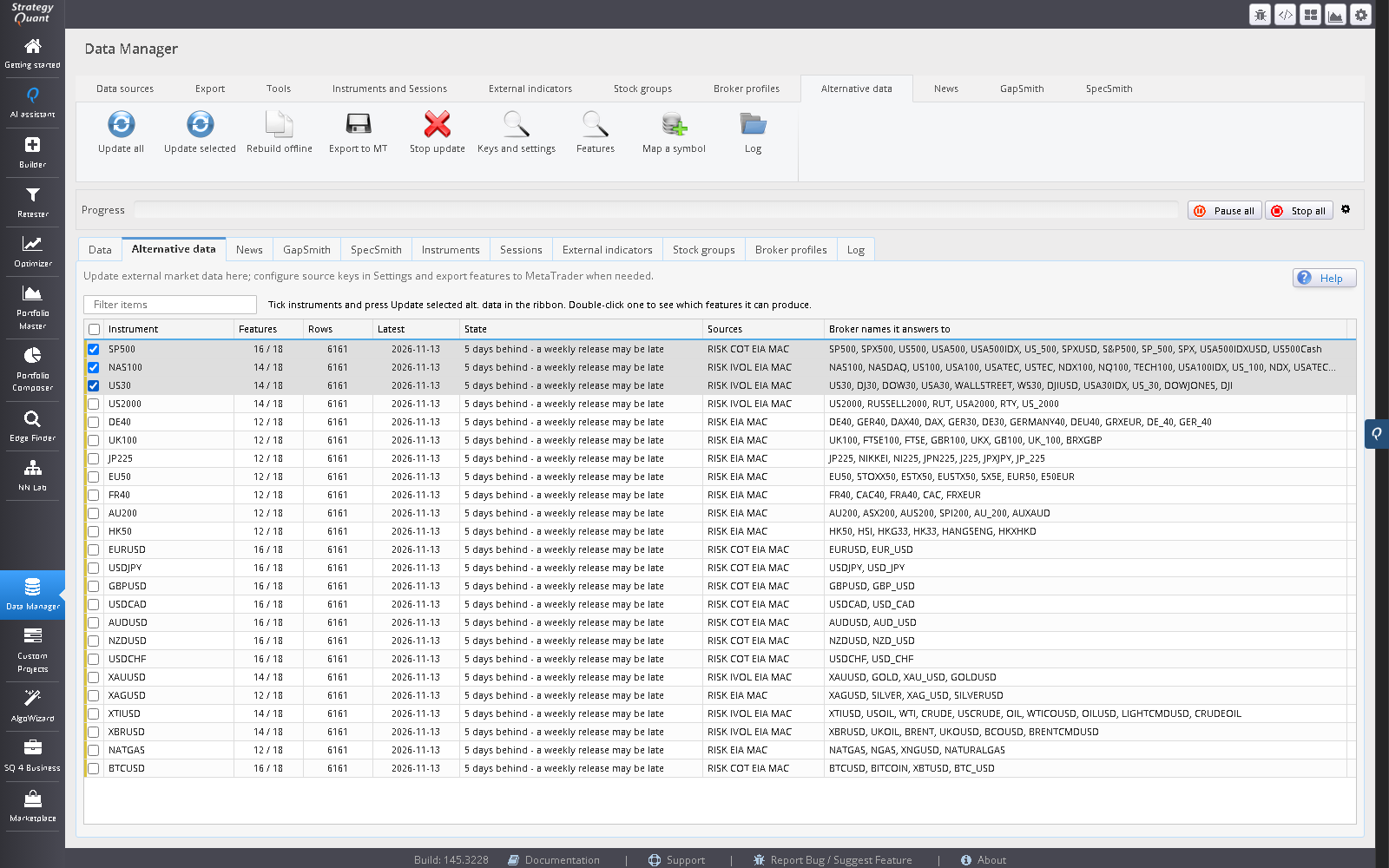
Instruments
The tab itself is a grid of the 24 instruments with the state of each one’s data; the search box filters it. Tick rows and press Update selected in the Alternative data ribbon tab, or press Update all for all of them. Rebuild offline rebuilds every feature file from the caches already on disk with no network access (also the right thing after editing catalog.csv). Export to MT copies the files out on demand. Stop alt. data update cancels a running job; progress shows on the toolbar. When an update finishes a report opens: per source, the outcome, the rows added and rejected and the detail of anything that failed.
Double-click an instrument to see Feature availability for it: all 18 features, whether each is available, and, if not, why not. A feature marked unavailable is not missing data; the instrument has no source that could ever produce it.
The Map a broker symbol button opens a dialog where you tell the module that a broker ticker is one of the 24 instruments (or none), then Save mapping; existing mappings are listed beneath it. Alt. data log opens the module’s log.
Features
The Alt. data features button opens the eighteen-column contract with ordinal, column name, source and definition, as in the table above.
Keys and settings
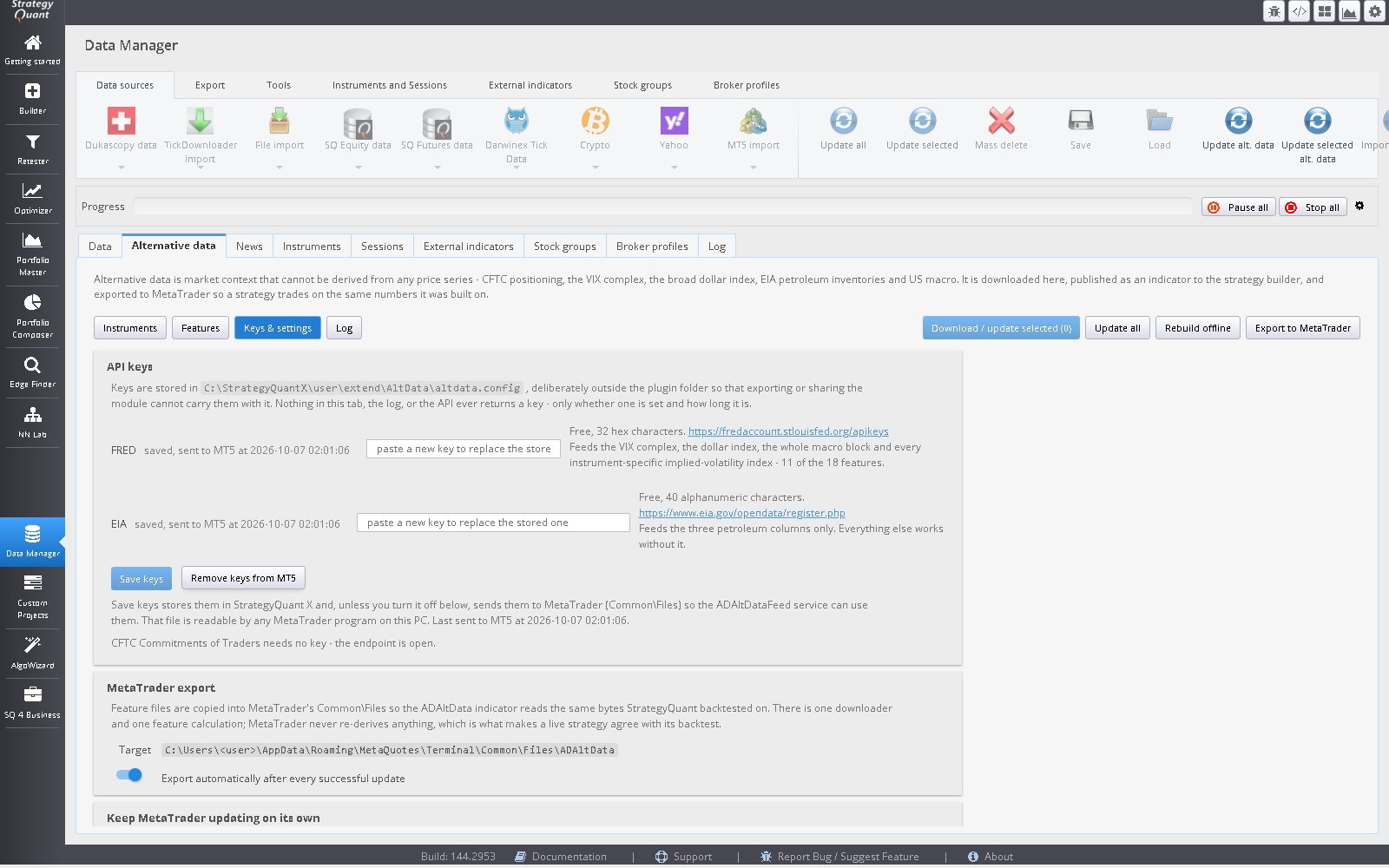
The Alt. data keys and settings button opens this dialog.
- FRED, EIA
- Each shows missing, saved or saved, sent to MT5 at <time>. Save keys stores them in SQX and, unless you turn it off below, sends them to MetaTrader. Remove keys from MT5 deletes the sent file and turns sending off; the keys stay in SQX. Nothing in the tab, the log or the API ever returns a key, only whether one is set and how long it is.
- MetaTrader export, Target
- The MT5
Common\Filesfolder the files go to. If none is found, setmt5.commonFilesDirin the configuration file (for a portable terminal, or to push to a VPS). - Export automatically after every successful update
- Copies the feature files to MetaTrader whenever an update succeeds.
- Export the raw download caches too
- Lets the MT5 service start warm. Without it the service still works but cold-starts every series from 2005 on its first pass, which is a VPS re-downloading twenty years from three free APIs. Costs a few MB.
- Send my API keys to MetaTrader’s Common\Files when I click Save keys
- On by default because these are free personal keys. The file is readable by any MetaTrader program (EA, script, indicator) on this PC, so untick it on a shared or rented machine and type the keys into the service’s own inputs instead. Unticking also deletes a keys file SQX sent earlier; one created by the installer or in MetaTrader is kept.
- Paths and diagnostics
- The configuration file, data directory, feature-file directory and log file. Other settings (grid start date, HTTP timeouts and retries, the quality gates, the log level) live in the commented configuration file, which is re-read whenever it changes, so an edit takes effect on the next update without a restart.
Log
The module’s running log. The same lines go to user\extend\AltData\logs\awaltdata.log, with every key masked.
Three states, not two
This distinction is the most consequential one in the module, and every layer preserves it.
| State | When | What the indicator emits |
|---|---|---|
| Value | The row has a number. | The number, with Available = 1. |
| Missing | The instrument has this source but the cell is blank, or the bar predates the file. | The column median, with Available = 1. |
| Unavailable | The column is blank in every row; no source could produce it. | 0, with Available = 0. |
A gap is filled with the median rather than zero, because a VIX of 0 is an impossible reading, not a missing one, and a spike to an impossible value is indistinguishable from a signal. A structurally absent column has nothing true to substitute, so it emits zero and flags itself. Every value-based condition block checks Available before its comparison. Zero is a normal reading for many of these series, so without that guard “AltData(ivol) is lower than 0.5” would be true on every bar of every FX chart forever, and the builder would happily select a filter that does nothing.
Builder blocks
Six indicators and ten condition blocks, under AW AltData. The general AltData indicator offers all eighteen features in one list. Five family indicators offer the same series in named groups, so the builder searches a short list that fits the instrument and a stored rule reads AltVolatility(1) instead of AltData(1).
| Family indicator | Series |
|---|---|
| Alt Data: Volatility | VIX level and 5-day change; the instrument’s own implied volatility (gold, oil, indices) and its 5-day change. |
| Alt Data: Rates and Dollar | Dollar index change, 10-year yield change, 10y–2y curve, 5-year breakeven change, Fed–ECB policy gap. |
| Alt Data: Positioning (COT) | CFTC leveraged-fund net position, its 1- and 3-year percentile and 4-week change. The two percentiles overlap SQX 145’s native speculator index — prefer the native block there. |
| Alt Data: Petroleum (EIA) | Crude stocks percentile and 4-week change, refinery utilisation. The same series for every instrument that lists the EIA source, which is all 24. |
| Alt Data: US Macro | CPI year-over-year, 12-month unemployment change. |
A family indicator is the general one with a shorter list. It stores the same series number, reads the same file and exports to MetaTrader through the same AWAltData indicator, so a strategy built with either trades on identical numbers. The ten condition blocks below still take any series.
The indicators also have an InstrumentOverride parameter for charts that carry no instrument identity, such as the Indicator Tester chart: 0 uses the chart symbol, 1 selects SP500 and 2 selects NAS100. On a real SQX chart with an underlying symbol or instrument in the catalogue, the chart’s own identity wins and values 1 and 2 have no effect.
| Block | Meaning |
|---|---|
| AltData (the indicator) | Outputs Value, Available and AgeDays. |
| Rising / Falling | The feature is rising or falling. |
| Higher / Lower | The feature is above or below a level. |
| Cross Up / Cross Down | The feature crosses a level. |
| Changes Up / Changes Down | The feature moved by at least an amount. |
| In Range / Outside Range | The natural shape for a percentile regime filter. |
Feature is an integer ordinal, deliberately. SQX’s Indicator Tester passes parameters as a flat list of scalars, so a string parameter would make the block untestable; and an integer lets the builder search over which feature to use, the way to decide something no prior can settle.
Blocks that ask about the feature file rather than the market (is it available, is it fresh) are not offered: availability is fixed for an instrument and age is measured against the clock at build time, so both would be constant on historical bars and the block would filter nothing. Availability is still enforced inside every block, and AgeDays is still published and shown in the tab and the monitor, which is where a stalled download should be noticed.
No look-ahead
Every row carries the date its observation became publicly knowable, and the join is on that date, not the observation date. The CFTC positioning report for a Tuesday is published the following Friday; a Wednesday bar reading Tuesday’s number would be reading the future. The rules below are the ones the code applies when StrategyQuant builds the feature files.
| Source | Stamp used |
|---|---|
| FRED daily market series: VIX, 10-year yield, 10y–2y curve, 5-year breakeven, ECB policy rate, and the per-instrument implied-volatility indices (GVZ, OVX, VXN, VXD, RVX) | The next day: observation date plus 1. |
| FRED effective fed funds rate (DFF) | Two days after the next business day (Monday to Friday; no holiday calendar). A Friday print is stamped the Wednesday. |
| FRED broad dollar index (DTWEXBGS) | The first Monday after the observation date, plus 2 days, so a Wednesday. The Federal Reserve posts it weekly on Mondays. |
| FRED CPI (CPIAUCNS) | The 18th of the following month. |
| FRED unemployment rate (UNRATE) | The 12th of the following month. |
| CFTC Commitments of Traders | The day after the release. The release is the Friday after the Tuesday report date, or the next business day when that Friday is a US federal holiday. So the stamp is the Saturday, or the Tuesday after a Monday release. |
| EIA weekly petroleum report | The day after the release. The release is the Wednesday after the Friday the week ends, pushed back one business day for each US federal holiday on the Monday, Tuesday or Wednesday of that week. In a week with no holiday that is the Thursday, the Friday date plus 6 days. |
Each rule is a whole day after the release, and the fixed monthly days sit after every scheduled release: the BLS has scheduled the jobs report as late as the 10th, which is why unemployment is stamped the 12th and not earlier. The stamping is conservative on purpose. A few days of extra lag costs a strategy almost nothing on a series that moves monthly or weekly; reading a number before it was published makes the backtest untradeable. The holiday rules are a fixed list of the eleven US federal holidays. Ad-hoc closures (a national day of mourning, a government shutdown) are not modelled, and an unscheduled delay can push a release past its stamp; CPI after the October 2013 shutdown is the known example.
Row dates are UTC midnight and bar times are in broker time, so on a broker running ahead of UTC the first bar of each broker day reads that day’s row two or three hours “early”. That is why the buffers are whole days: the buffer is the guarantee, and the timestamp comparison is not asked to carry it.
MetaTrader 5
Indicators and script
AWAltData- The reader. Needs no WebRequest entry and makes no network calls, which is why it behaves identically in the Strategy Tester. It reads the exported file as of the bar date and emits
Value,AvailableandAgeDays. It watches the file’s modification time and reloads (at most once every 30 seconds, with a full recalculation) when the service has changed it. AWAltDataMonitor- An on-chart health panel. Attach it to any chart to see every feature for that instrument with its value, its age in days, and whether the instrument has a source at all. This is how you notice the quiet failure: if both the export and the feed stop, nothing breaks, the indicator keeps returning the last values it has, and the only symptom is a percentile that has not moved in six weeks.
AWAltDataKeys(script)- Navigator → Scripts → AWAltDataKeys sets, replaces or removes either key in
Common\Files\AWAltData\altdata.keys. The feed service also opens a small window the first time it runs without a key (Ask me later snoozes it a week, Don’t ask again stops it).
The feed service
To keep a deployed terminal current, add AWAltDataFeed (Navigator → Services → Add; the installer can register it for you). It downloads the same sources on the terminal, and each pass it recomputes the 60 days immediately below its rewrite cutoff, rows this module wrote, and compares them with the exported file. If they disagree by more than 1e-6, or disagree about whether a value exists at all, it refuses to touch the file, raises an alert, and the strategy keeps reading the last known-good data. That turns parity from an assumption that quietly decays after release into an assertion that re-runs, in production, on the machine that trades.
Three constraints keep the forward region clean:
- The service never creates a feature file. History comes from the module that owns the maths. A terminal that built its own history from scratch would have nothing to check itself against.
- Only a 14-day tail is rewritten. A row for today is incomplete until the day’s prints land, and a weekly source can revise within a fortnight. Everything older is frozen, so a completed backtest cannot have seen bars that did not exist when it ran.
- A rewrite that would shorten the file is refused, on both sides, because a provider answering with an empty payload looks exactly like a successful update.
The service does not run in the Strategy Tester. That is correct: a backtest must read frozen data or it is not reproducible. Each pass logs one line per source to the Experts tab, plus the parity verdict per instrument (“parity OK — N values verified … largest difference …”).
The service needs three hosts allowed under Tools → Options → Expert Advisors → Allow WebRequest for listed URL, each as its own entry, host only: https://api.stlouisfed.org, https://publicreporting.cftc.gov, https://api.eia.gov.
Quality gates
- Plausibility bands. Every FRED series is fetched with a band wide enough for any print in its real history and tight enough that transport corruption cannot pass. Rejections are counted and reported: one is noise, a hundred is a format change at the provider.
- Row-loss refusal. A rebuild that would produce more than a set fraction fewer rows than the file on disk is refused, loudly, and the old file is kept. A provider answering with an empty payload looks like a successful update, and the history it would overwrite cannot always be downloaded again.
- Header verification. Feature files are read by column name, never by position, and a header this build does not recognise is reported column by column.
- Atomic writes. Every file is written to a temporary name and moved into place, because these files are shared and a chart indicator may be reading one at that moment.
- Backups. A configurable number of timestamped copies are kept before each replace.
Operating it
When data arrives
Data arrives on the providers’ calendars, not StrategyQuant’s: FRED daily, the CFTC on Friday afternoons, the EIA on Wednesdays. Update before you open the builder, or schedule it.
Headless updates
For a scheduler, the module has a command-line entry point. From the SQX install root:
j64\bin\java -cp "user/extend/Plugins/AWAltData/AWAltData.jar;internal/libs/*" ^
    com.strategyquant.userplugins.awaltdata.AltDataCli update
The commands are status, update [--offline] [SYMBOL …] and export. The exit code is 0 when clean, 1 when it finished with problems and 2 when it could not run.
Where keys and settings live
Your keys are stored in user\extend\AltData\altdata.config, deliberately outside the plugin folder, so exporting or zipping the module cannot carry them. Never share that file. Two things can be overridden from outside it: the config file location (the AWALTDATA_CONFIG environment variable) and the keys themselves (the FRED_API_KEY and EIA_API_KEY variables, used only when the file’s keys are empty).
Platform support
| Platform | State |
|---|---|
| MetaTrader 5 | Full. AWAltData reads the exported file. |
| PseudoCode | Full; it is a description and describes this exactly. |
| MetaTrader 4, NinjaTrader 8, JForex | Templates ship but are stand-asides: an export compiles, every alt-data condition is false, and the reason is logged once. Not supported. |
| EasyLanguage | An export using these blocks will not compile. That is deliberate: a loud failure beats a strategy quietly trading on a substituted number. |
No template ever substitutes a value for missing data.
Known gaps
- Gold, silver and WTI carry no COT columns. That positioning exists, but in the CFTC’s disaggregated report, a different dataset with different column names.
- FX has no implied-volatility index. The only one (EVZ) was discontinued in March 2025; a dead series backfills as a flat line and reads as a real feature, so it is not wired.
- No GEX (options gamma). Not part of this version.
- The forward region is a second implementation. The MT5 service re-derives the same eighteen features. That is contained rather than eliminated: history is never touched, only a 14-day tail is recomputed, and the overlap check compares 60 days of SQX’s own rows before every write. Change a transform on one side only and the service refuses to update and says so; that is the intended behaviour.
- CFTC contract names are free text. If a contract is renamed, a predicate can stop matching and produce an empty result; on a cold cache that is reported as a failure naming the predicate, not as “no new data”.
Troubleshooting
| Symptom | Cause and fix |
|---|---|
| The tab is not in the Data Manager | The plugin did not register. Restart SQX; check the SQX log. |
| The AW AltData blocks never appear | A block is only offered if it can be evaluated. Press Update all first; with no data downloaded the blocks are unavailable by design. |
| 11 features will not update | No FRED key. Paste it under Alt. data keys and settings and Save keys. |
| Only petroleum features are blank | No EIA key. |
| An instrument shows everything unavailable | Its broker symbol is not mapped. Use Map a broker symbol. |
| A feature is “unavailable” for one instrument only | That instrument has no source for it (for example COT for gold). Double-click the instrument for the reason. |
| The MT5 service does nothing | It is not started (Navigator → Services), or the three hosts are not allowed under Expert Advisors → WebRequest, or no keys reached it (Save keys, or the AWAltDataKeys script). The Experts log names each missing key and the exact step. |
| “parity” failure alert from the service | The terminal’s recomputation disagreed with SQX’s rows. The service refuses to update and the strategy keeps the last known-good data. Run Update all and Export to MT in the Alternative data ribbon tab in SQX, then check the service log. |
| A percentile has not moved in weeks | Both the export and the feed have stopped. Attach AWAltDataMonitor to see each feature’s age. |
| MT5 shows older values than SQX | The export has not run since the last update. Press Export alt. data to MT, or leave auto-export on. |