Time windows and sessions for StrategyQuant X, measured and corrected
A session filter picked from the best hour of the day has not been charged for the hours that were looked at. This page explains what the Edge Finder Time Windows tab searches, how it corrects for the search, what it says about the clock, and what lands in the Build task when you press Apply. It is a tab in Edge Finder.
1. The question
You have intraday data for a symbol and a suspicion that some hours are worth entering in. Written down as a rule, it is a Limit time range on the Build task. The trouble is that the best of 24 hours on five weekdays always looks like something. Time Windows counts the whole search and adjusts for it.
2. What is searched
Windows are runs of consecutive slots on a 24-hour ring. Slot length is 60 minutes on H1 and above, 30 on M30 and 15 on M5 and M15, or you choose one. The longest window is 12 hours unless you change it (1 to 24). Every window is tried on twelve weekday sets. Each date contributes one number to a window: the total entry result of the bars inside the window that day, with the average bar subtracted, so drift is removed. One number per date also removes the overlap between neighbouring bars’ holding periods, which means the sample size is days and not bars.
3. The correction
The family is every window on every weekday set. On each of 1000 sign-flips (settable from 100 to 5000, seeded), the strongest window anywhere in the family is recorded. A window’s adjusted p is the share of flips whose strongest window reaches its strength. The grade comes from that number: strong below 0.01, clear below 0.10, weak below 0.25.
The permutation flips the sign of a whole date, which keeps the date’s intraday shape and volatility and changes nothing else.
4. The clock
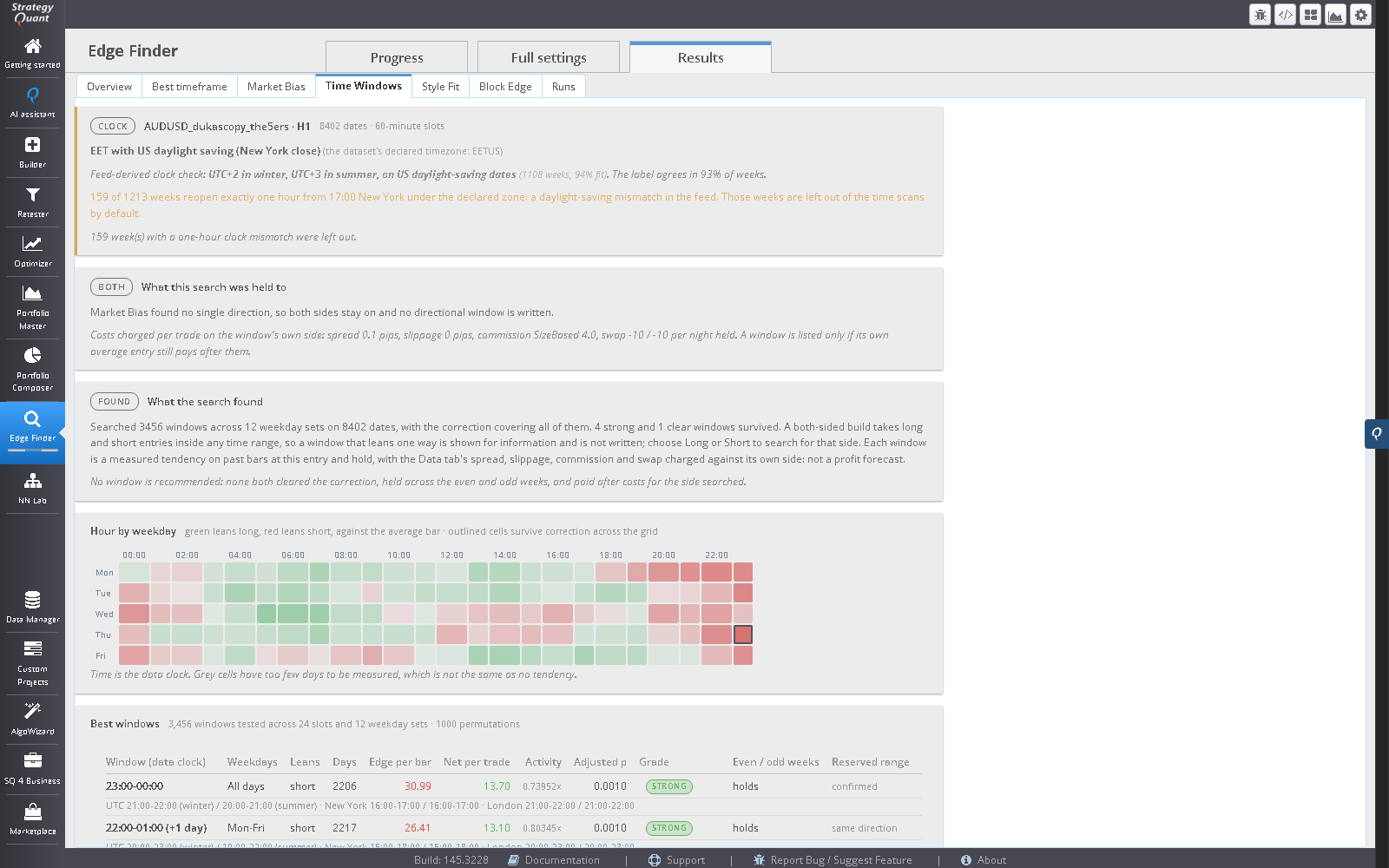
The zone comes from the dataset’s declared timezone: an IANA name such as Europe/Berlin, UTC, a fixed offset, or SQX’s own EETUS. If the dataset declares none, type one into the Data clock field (for example UTC, UTC+2, EETUS or Europe/London). If no zone can be resolved, windows are shown on the data clock only and the session views are off. Nothing is assumed to be UTC.
For forex-style data the audit converts each week’s reopening to New York time and checks it against Sunday 17:00. Weeks that land an hour off are counted, listed and left out of the scan by default, with a switch to include them. If the label and the feed disagree, the tab says the Data tab’s timezone for this symbol is probably wrong and tells you to check it before trusting any hour in the report. When the history shows a single offset, it adds that a daylight-saving rule cannot be ruled out.
Indices, stocks and futures have no reopening anchor, so the audit is skipped there and says why. For those symbols the check of the label is yours.
5. Reading the result
- Clock card
- The zone, where it came from, and the audit verdict.
- Hour by weekday
- The grid of average entry results, with slots that have too few days shown as unmeasured and not as flat.
- Best windows
- Edge per bar, adjusted p, grade, the even and odd week check and the reserved-range check, plus Net per trade: the window’s own average entry on the side it leans, less the Data tab’s costs. Only windows where it is positive are listed for a one-sided search. Under each row the window is shown on UTC, New York and London for a winter and a summer date.
- Named sessions
- Sydney, Tokyo, London, New York and the London and New York overlap, each with local hours, lean, adjusted p and grade.
- Stretches to stay out of
- Adverse, dead and thin stretches.
A window restricts when an entry may be taken. Because the trade is held for several bars, the strongest entry window often sits a few bars before the move it catches. That answers “when should I enter”, and it is why a window does not describe when the market moves.
6. From the tab to the Build task
| On the Time Windows / Deploy tab | In the Build task |
|---|---|
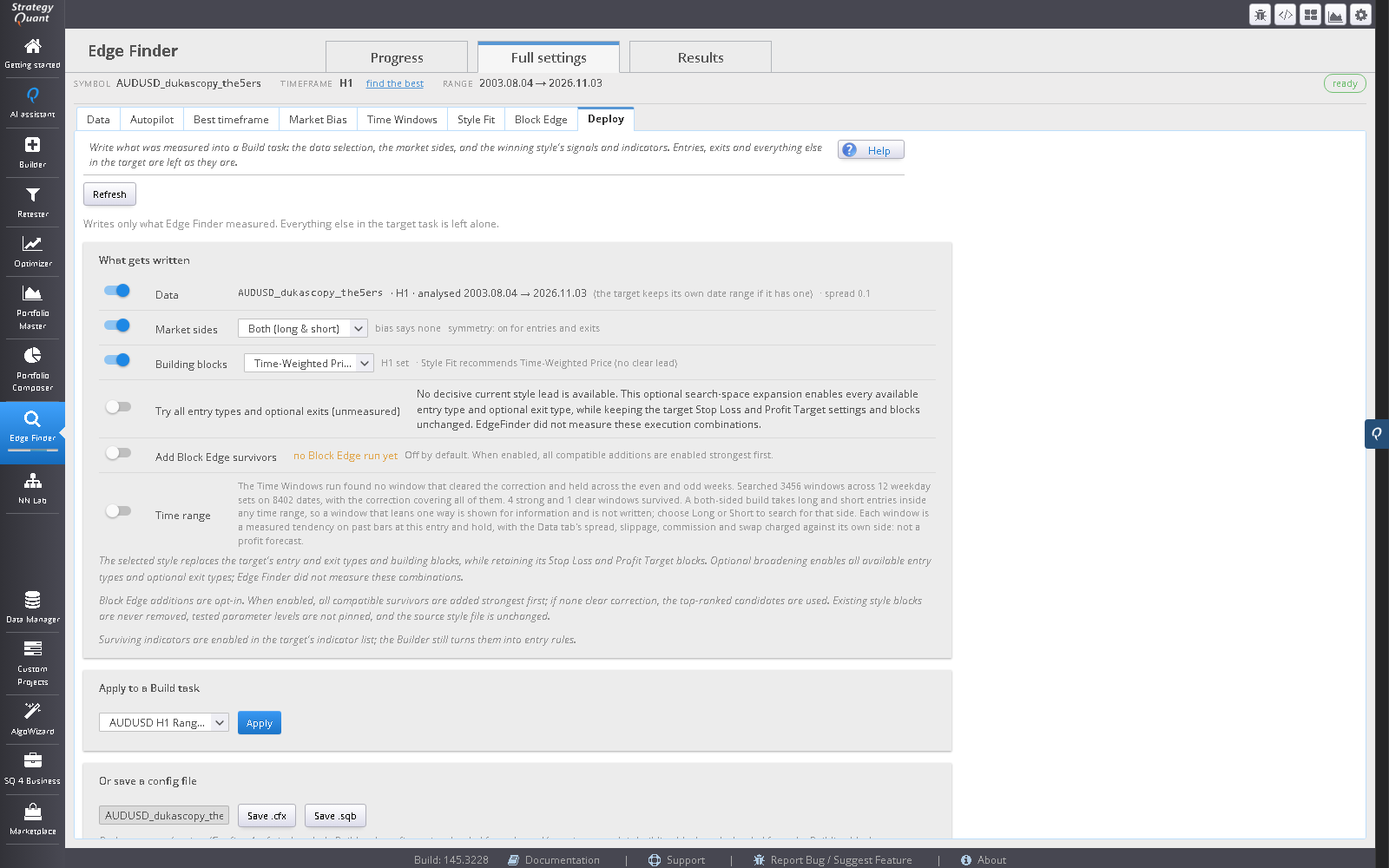
| Recommended window, for example an overnight window | Limit time range switched on, From later than To for an overnight range |
| A window ending at 24:00 | To stored as 00:00 |
| Window time on the data clock | Seconds after midnight, on the clock SQX evaluates the range on |
| Weekday set | Not written; the task has no weekday filter beyond its weekend settings |
| Exits | Not touched |
| Side (Follow the window) | Market sides, only if you tick it |
If your trading broker’s clock differs from the data clock, check the converted times shown under the window (UTC, New York and London for a winter and a summer date) before you trade it.
7. Where it fits
- DATA
- DECIDE
- BUILD
- TRADE
Related: session edges on any symbol, news blackouts, Session filter in StrategyQuant X, Time windows on the data clock, and Edge Finder. News is the separate module for release blackouts.
8. Limits
- Exchange holidays and early closes are not modelled.
- Sparse intraday data leaves slots with too few days.
- Daily and longer bars have no time of day and are refused.
- A window is a measured tendency on past bars. Costs come from the Data tab; if it holds none, none are charged.
9. Questions
Is this the same as the News blackout?
No. A news blackout in News keeps a strategy flat around scheduled releases from your own MT5 calendar. Time Windows finds hours that lean. They can be used together.
Can I get a weekday filter?
The tab reports the weekday set for each window, but the Build task has no weekday filter beyond its weekend settings, so only the time range is written.
Why is a window I expected missing?
Either it did not clear the correction, it did not hold across even and odd weeks, its sign was contradicted on the reserved range, or it did not pay after the Data tab’s costs. The tab says “No window is recommended” when nothing passes all of them.
Does it work on daily bars?
No. A daily bar has no time of day, and the tab refuses it. Pick H4 or shorter on the Data tab.
Do the sessions follow daylight saving?
Yes. Each named session uses its own exchange-local clock, and each window is shown on UTC, New York and London for a winter and a summer date.
Is it deterministic?
Yes. The permutations are seeded, so the same data and settings give the same answer.
Trading leveraged instruments carries a high risk of loss. Software output is not investment advice and says nothing about future results. Validate every strategy yourself before risking capital.
Trading leveraged instruments carries a high risk of loss. Software output is not investment advice and says nothing about future results. Validate every strategy yourself before risking capital.