One small Windows installer, driven by your licence.
The installer is a small download with no product code inside. It asks for your licence key first, then downloads only the products that licence covers, checks them against a signed manifest, and copies them into your StrategyQuant X user folder and your MetaTrader 5 data folders. It runs per user and needs no administrator rights.
What has to be there first
| Component | Requirement |
|---|---|
| Operating system | Windows, 64-bit. The licence is tied to the Windows machine identity. |
| StrategyQuant X | Required for every module except the MT5-only parts. Edge Finder targets build 144.2953; other builds are not claimed. StrategyQuant X is a separate product you license yourself. |
| MetaTrader 5 | Needed to run the MT5 indicators, to deploy NN Lab models, and as the source of the calendar for News. No MetaEditor or MQL5 source is needed to run them. |
| Free API keys (Alternative Data) | Two keys that you register yourself, both free: FRED (needed for 11 of the 18 features) and EIA (the three petroleum features). The CFTC source needs no key. News needs none. |
| Internet | To activate the licence, to download the packages, for Alternative Data’s data downloads, and for the licence and update check the updater task makes at logon and every 24 hours. Licence verification itself is offline. |
Install, then let StrategyQuant compile
Close StrategyQuant X and MetaTrader 5
Files are replaced while they are not in use.
Run the installer and enter your licence key
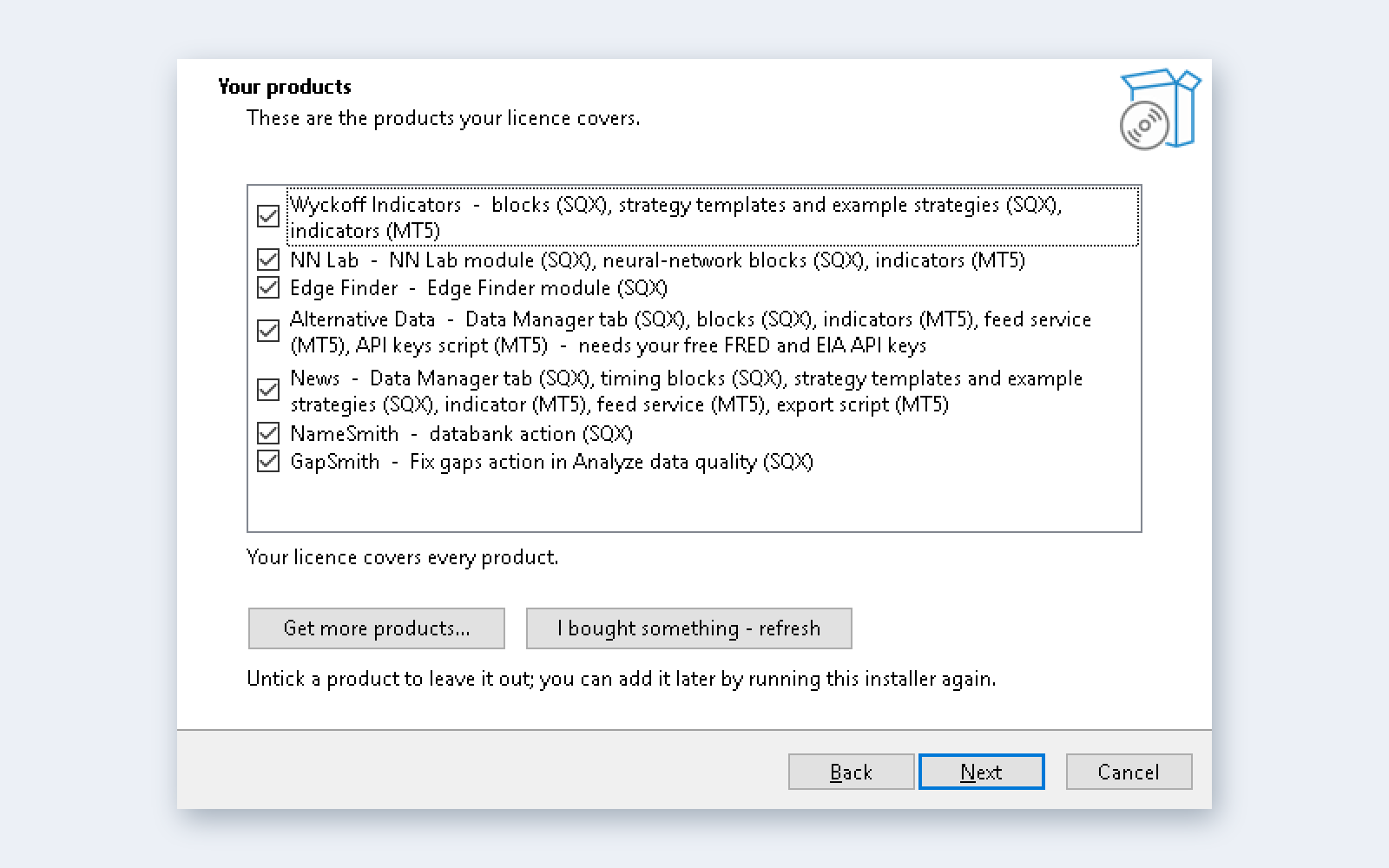
One key unlocks everything bought with the same e-mail address, now and later. The next page, Your products, lists what the licence covers, all ticked; untick any you want to leave out.
Choose your folders and install
Pick the StrategyQuant X folder and the MetaTrader 5 terminals (up to eight; you can add a portable terminal folder). A key works on two computers at once; entering it on a third releases the one used least recently. On Install the packages are downloaded and verified first; files are copied only when every package passed. The installer writes
license.licunder%ProgramData%\Alphasworthfor the Java side and under the MetaTrader common files folder for the MT5 side, and can register one per-user scheduled task, the updater. For News and Alternative Data it registers the MetaTrader 5 feed services you tick; it never starts or closes MetaTrader.Start StrategyQuant X
StrategyQuant compiles user snippets at start, so the first launch is slower and a block that fails to compile is simply absent from the builder. Some plugins need a restart after SQX compiles them.
Module set-up
- Alternative Data: Data Manager → Alternative data → Keys & settings → paste your FRED key and your EIA key and press Save keys → Download / update selected or Update all (about 20 seconds from cold for all 24 instruments).
- News: run the export script on any MT5 chart, check the journal reports releases ahead of today, then open Data Manager → News and import.
- MT5 services (Alternative Data, News): the installer registers the services you ticked and, for Alternative Data, adds the three WebRequest hosts. MetaTrader starts a registered service by itself whenever the terminal runs, so start MetaTrader yourself (on a VPS, set it to start at logon). If a service is not running, start it under Navigator → Services and, for Alternative Data, allow the three data hosts under Tools → Options → Expert Advisors → WebRequest. The terminal has to stay running and logged in for a service to run.
- NN Lab: models are trained inside SQX; press Deploy to MetaTrader 5 on the Models tab to copy them to the shared MetaTrader Common folder. Nothing is compiled.
Where a step on screen differs from this page, the installer’s own notes win.
14 days, every product, no card
Enter your e-mail address and you get a trial key on this page at once. Enter it in the installer like a purchased key. It unlocks every module for 14 days, the same length as the StrategyQuant X trial, on up to two computers. You can have one trial per e-mail address. See the trial policy.
Copy the key before you leave this page; we do not e-mail it. If you lose it, write to support.
Two computers at a time, moved as often as you like
A key works on two computers at once, such as your research PC and your trading VPS. If one of them is a VPS or you may move the terminal later, choose the standard x64 build on the installer’s CPU page rather than an AVX build tuned to this machine. To add or replace one, run the installer there and enter your key: if two computers already use it, the one used least recently is released. If the old computer is gone, or you would like to free the key before reinstalling, reset it here. There is no limit on moves or resets.
The old computer is not switched off the instant you move. It stops at its next licence refresh: within about a day if the updater task is still there (it runs at logon and every 24 hours), and at the very worst 5 days after its last successful refresh (3 days plus a 2-day grace period).